

NORMALITY TEST
IN SPSS” custom_color=”#ffffff” css=”.vc_custom_1584445502099{margin-bottom: 39px !important;}” mobile_font_size=”42″][advice_button align=”right” shape=”” i_icon_fontawesome=”fa fa-chevron-circle-down” add_icon=”true” text=”SHOW MORE” link=”url:http%3A%2F%2Fwww.staging.onlinespss.com%2Fhow-to-run-normality-test-in-spss%2F%23nomtab|title:more%20info%20about%20test||”]
1.Normality Tests for Statistical Analysis
This easy tutorial will show you how to run the normality test in SPSS, and how to interpret the result. In another word, The aim of this commentary is to overview checking for normality in statistical analysis using SPSS.
A normal distribution is a common probability distribution. In addition, It has a shape often referred to as a “bell curve.”
Many everyday data sets typically follow a normal distribution: for example, the heights of adult humans, the scores on a test given to a large class, errors in measurements. That is to say, the normal distribution is always symmetrical about the mean. (Source)
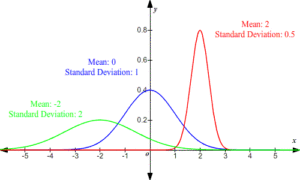
Statistical errors are common in scientific literature and about 50% of the published articles have at least one error. In addition, The assumption of normality needs to be checked for many statistical procedures, namely parametric tests, for the reason that their validity depends on it. (Source)
The prerequisite for most of the statistical tests is normal data distribution. Therefore, We use tests of normality to assess whether data is normally distributed or not. If the data is normally distributed so we can use the parametric tests. In another case, it is better to use nonparametric tests. We can also use plots to assess data distribution.
We use the Shapiro-Wilk test when we have a small sample size (N < 50) and Kolmogorov-Smirnov test when we have a large sample size (N > 50).
2. An Example: Normality Test in SPSS
We collected data from 32 workers about their age and height in centimeters. To examine whether data for age and height are normally distributed, we used tests of normality.
Null hypothesis:
Data is normally distributed.
Alternative hypothesis:
Data is not normally distributed.
Finally, This easy tutorial will show you how to run the normality test in SPSS, and how to interpret the result.
How to Run Normality Test in SPSS: Explanation Step by Step
From the SPSS menu, choose Analyze – Descriptives – Explore

A new window will appear. From the left box, transfer variables Age and Height into Dependent list box. Click Both in the Display box.

Click on Statistics… button. A new window will open. Choose Descriptives. Click Continue, and you will return to the previous box.

Click on Plots… button, New window will open. In the Boxplots box, choose Factor levels together. In the Descriptive box, choose Stem-and-leaf and Normality plots with tests. Click Continue, and you will return to the previous box. Click OK.
The test of normality results will appear in the output window.

How to report a Chi-square test for independence results: Explanation Step by Step
How to Report Case Processing Summary Table in SPSS Output?
The first table is the Case Processing summary table. It shows the number and percent of valid, missing and total cases for variables Age and Height.
How to Report Descriptive Statistics Table in SPSS Output?
The second table shows descriptive statistics for the variable Age and Height.

How to Report P-Value of Kolmogorov-Smirnov and Shapiro-Wilk tests of normality Table in SPSS Output?
The third table shows the results of Kolmogorov-Smirnov and Shapiro-Wilk tests of normality (tests statistic, degrees of freedom, p-value). Since we have less than 50 observations (N = 32 < 50), we will interpret Shapiro-Wilk test results.
If p (Sig.) > 0.05, we fail to reject the null hypothesis and conclude that data is normally distributed so we must use parametric tests.
if p-value is less than 0.05. Therefore, we must reject the null hypothesis in other word data is not normally distributed. We must use nonparametric tests.
In our example, the p-value for age is 0.018 < 0.05. Therefore, we must reject the null hypothesis and conclude that age is not normally distributed.
How to Report Normal Q-Q Plot in SPSS output?
The output also shows the Normal Q-Q Plot for Age and Height.
If the data points are close to the diagonal line on the chart so we conclude that data is normally distributed otherwise data set does not show normal distribution.
From the chart for age, we can conclude that data points are not close to the diagonal line, so we conclude that data are not normally distributed.
Shapiro-Wilk test of normality was conducted to determine whether Age and Height data is normally distributed. The results indicate that we must reject the null hypothesis for Age data (p = 0.018) and conclude that data is not normally distributed. Consequently, the results also indicate that we fail to reject the null hypothesis for Height data (p = 0.256) and conclude that data is normally distributed.
Visit our Reporting Normality Test Page for more details.

Start by clicking on the GET INSTANT QUOTE button, enter the required details, and upload supporting files to submit your assignment through our user-friendly order form.
Our experts will review and update the quote for your assignment. Make the payment to start the processing, we have PayPal integration which is quick and secure.

Just Relax! You will receive a high-quality result that is 100% plagiarism free within the promised deadline. We will send the solution to your e-mail as per the agreed deadline.