

Looking for ANOVA test in SPSS? Doing it yourself is always cheaper, but it can also be a lot more time-consuming. If you’re not good at SPSS, you can pay someone to do your SPSS task for you.
[/advice_text_block][advice_space large_desktop_space=”5″ desktop_space=”5″ tablet_space=”5″ landscape_mobile_space=”10″ mobile_space=”10″][advice_button align=”left” shape=”rounded” text=”Get a FREE Quote Now!” link=”url:http%3A%2F%2Fwww.staging.onlinespss.com%2Fsubmit-your-project%2F|title:Submit%20Your%20Statistics%20Project-Homework-Assignment|target:%20_blank|”][advice_space large_desktop_space=”5″ desktop_space=”5″ tablet_space=”5″ landscape_mobile_space=”10″ mobile_space=”10″]

How to Run One Way ANOVA Test in SPSS: Explanation Step by Step
From the SPSS menu choose Analyze – Compare Means – One-way ANOVA
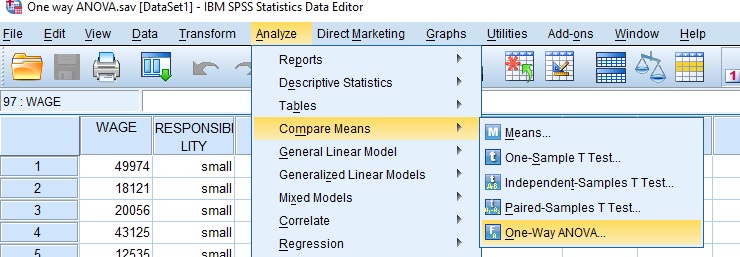
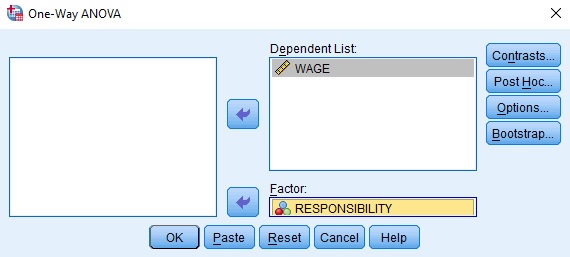
Box with variables will open. Transfer the continuous variable wage into the dependent list box, and factor variable responsibility to factor box.
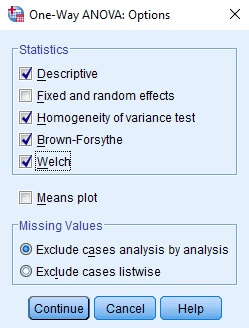
Choose Options, and a new window will appear. Check Descriptive, Homogeneity of variance test, Brown-Forsythe, and Welch. Click Continue.
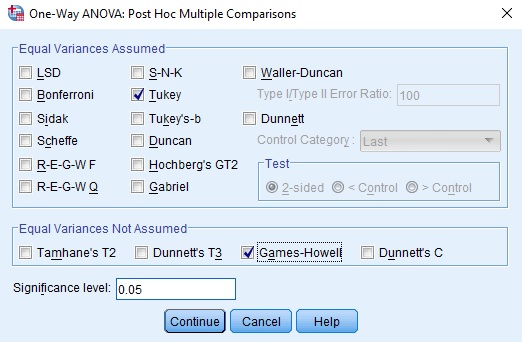
Choose Post Hoc test for ANOVA test
If we assume that we have equal variance across the group so we will use the first box of tests. The Tukey HSD test is the best option for this assumption. On the other hand, if our data does not have equal variance then we can pick up the Games-Howell or the LSD test.
The results will appear in the output window.
How to report One Way ANOVA Test for independence results: Explanation Step by Step
How to Report Descriptive Statistics Table in SPSS Output?
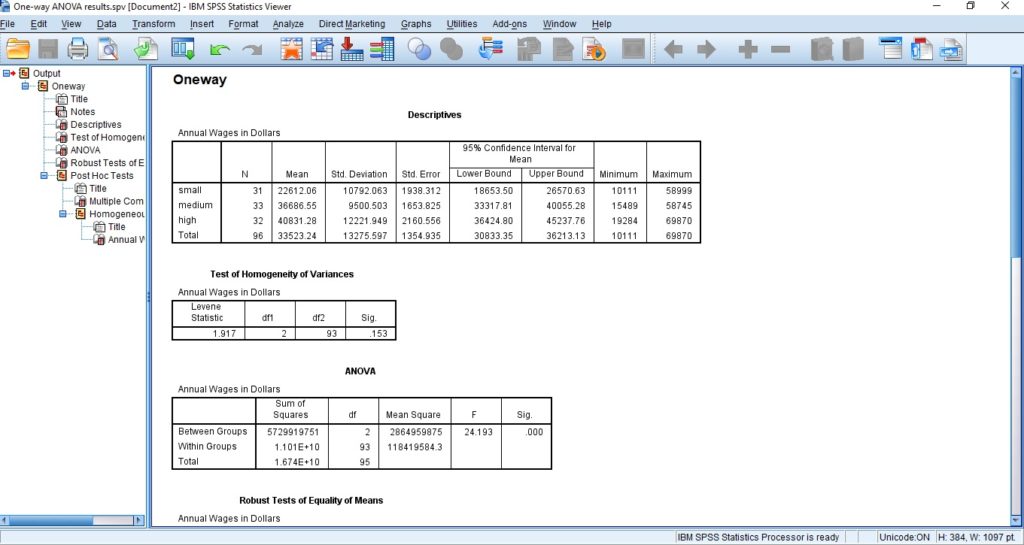
The first table in the output window shows descriptive statistics.
How to Report Test of Homogeneity of Variances Table in SPSS Output?
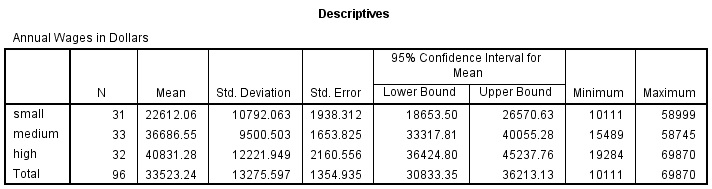
The second table from the output shows the results of the test of homogeneity of variances. It shows Levene statistic, degrees of freedom, and p-value (Sig.) In our example, p = .153 > .05, so we conclude that the assumption of homogeneity of variances is fulfilled and go to step 3.
How to Report P-Value in ANOVA Table SPSS Output?
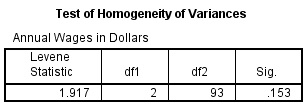
The third table in the output, ANOVA results, shows that whether the results between groups are significant or not.
If the p value is greater than 0.05, then we do not have any statistically significant difference between groups. However, in our example the p value is less than 0.05. Therefore, we conclude that there is a difference in average annual wages between job responsibility groups, F(2, 93) = 24.193, p = .000 < .05.
How to Report Post-Hoc Test in SPSS output?
The following table in the output window shows the results of the Post Hoc test.
The results of the test of homogeneity of variance (step 2) showed that we have equal variances. Therefore, we should look at the results of the Tukey HSD test.
The column mean difference shows the difference between the means of the two groups compared. For example, -14074.481 is the difference between mean annual wages for small job responsibility and medium job responsibility. Column Sig. (p-value) shows whether the mean difference is statistically significant.
In conclusion, there is a difference in annual wages between small and medium job responsibilities and small and high job responsibilities.

A one-way ANOVA was conducted to determine the effect of job responsibility (small, medium, high) on annual wages. The results indicate a significant effect, [F(2, 93) = 24.193, p = .000]. Post Hoc tests were conducted using Tukey’s HSD test. The comparison revealed significant difference between small (M=22612.06; SD=10792.06) and medium job responsibility (M=36686.55; SD=9500.50); between small (M=22612.06; SD=10792.06) and high job responsibility (M=40831.28; SD=12221.95). We, therefore, reject the null hypothesis that different levels of job responsibility (small, medium, high) have the same effect on annual wages.
Visit our “How to Run One-Way ANOVA Test in SPSS” page for more details. Moreover, go to the general page to check Other Reporting Statistical Tests in SPSS. Finally, If you want to watch SPSS videos, Please visit our YouTube Chanel.