[advice_space large_desktop_space=”156″ desktop_space=”156″ tablet_space=”100″ landscape_mobile_space=”100″ mobile_space=”100″][advice_heading font_weight=”800″ color=”custom” title=”Reporting Kruskal Wallis Test in SPSS” custom_color=”#ffffff”][advice_space large_desktop_space=”5″ desktop_space=”5″ tablet_space=”5″ landscape_mobile_space=”10″ mobile_space=”10″][advice_text_block font_weight=”400″ color=”custom” custom_color=”#ffffff” css=”.vc_custom_1663836787697{margin-top: 10px !important;}”]

Looking for the Kruskal Wallis Test in SPSS? Doing it yourself is always cheaper, but it can also be a lot more time-consuming. If you’re not good at SPSS, you can pay someone to do your SPSS task for you.

[/advice_text_block][advice_space large_desktop_space=”5″ desktop_space=”5″ tablet_space=”5″ landscape_mobile_space=”10″ mobile_space=”10″][advice_button align=”left” shape=”rounded” text=”Get A FREE Quote Now!” link=”url:http%3A%2F%2Fwww.staging.onlinespss.com%2Fsubmit-your-project%2F|title:Submit%20Your%20Statistics%20Project-Homework-Assignment|target:%20_blank|”][advice_space large_desktop_space=”5″ desktop_space=”5″ tablet_space=”5″ landscape_mobile_space=”10″ mobile_space=”10″]

[advice_space large_desktop_space=”156″ desktop_space=”156″ tablet_space=”100″ landscape_mobile_space=”100″ mobile_space=”100″]
[advice_space large_desktop_space=”25″ desktop_space=”25″ tablet_space=”25″ landscape_mobile_space=”25″ mobile_space=”25″]
[advice_space large_desktop_space=”25″ desktop_space=”25″ tablet_space=”25″ landscape_mobile_space=”25″ mobile_space=”25″]

How to Run Kruskal Wallis Test in SPSS: Explanation Step by Step

From the SPSS menu, choose Analyze – Nonparametric tests – Legacy dialogs – K Independent samples
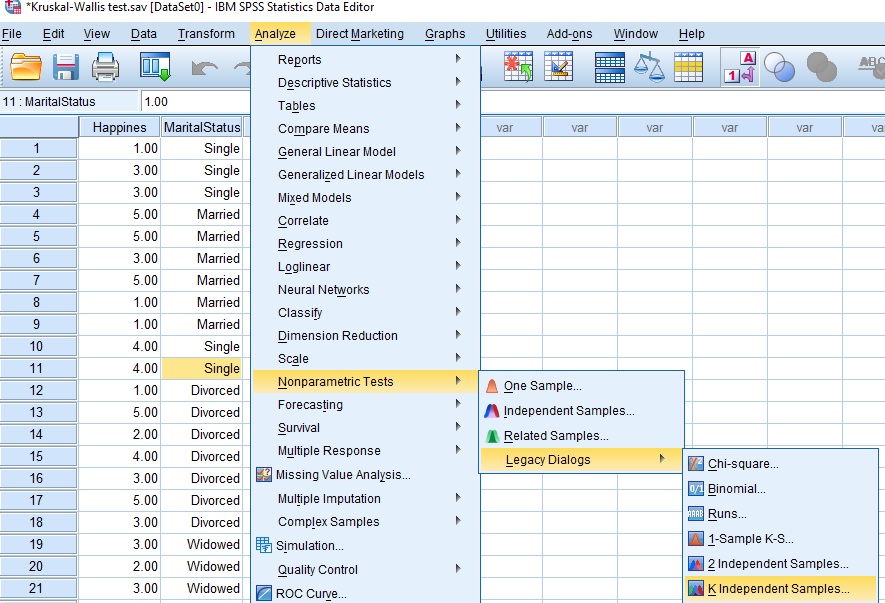
how to run kruskall wallis test in spss menu

A new window will open. From the left box transfer dependent variable Happiness in Test Variable List box, and categorical independent variable Marital status into Grouping Variable box. Click on Define Range… tab below Grouping variable box and a new window will open.
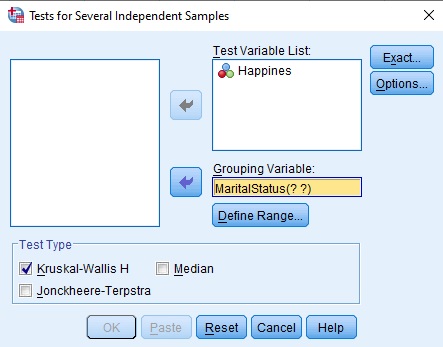
how to run kruskall wallis test in spss menu

In the box Minimum, enter the lowest group code, and in the Maximum enter the highest group code. We coded Marital status 1 – Single, 2 – Married, 3 – Divorced, 4 – Widowed, 5 – Separate. Therefore, we will enter 1 in the Minimum box, and 5 in the Maximum box. Click Continue, and you will return in the previous window.
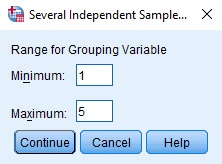
kruskal wallis test spss menu

Click the Options tab, and a new window will open. In the Statistics box, check Descriptive. Click Continue and OK.
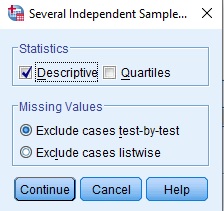
kruskal wallis test in spss

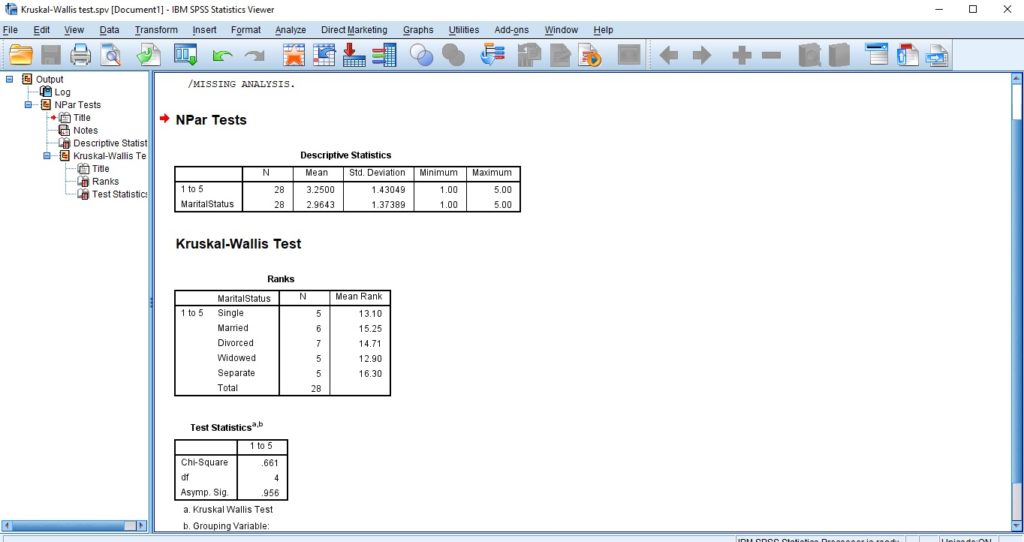
The results will appear in the output window.
spss output for kruskal wallis test
[advice_space large_desktop_space=”25″ desktop_space=”25″ tablet_space=”25″ landscape_mobile_space=”25″ mobile_space=”25″]
[advice_space large_desktop_space=”25″ desktop_space=”25″ tablet_space=”25″ landscape_mobile_space=”25″ mobile_space=”25″]

How to report Kruskal Wallis results: Explanation Step by Step

How to Report Descriptive statistics Table in SPSS Output?

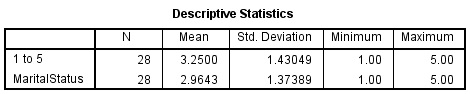
The first table in the output window shows descriptive statistics (number of observations, mean, standard deviation, minimum, and maximum).
descriptive statistci for kruskal wallis test

How to Report Ranks Table in SPSS Output?

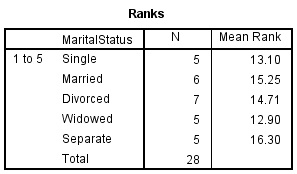
The second table shows Ranks – Number of observations and Mean rank for each group.
kruskal wallis spss output for ranks table

How to Report P-Value for Kruskal Wallis in SPSS Output?

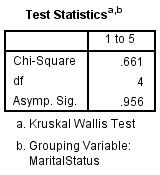
The third table in the output window shows Test statistics and the results show the Chi-square test statistic, degrees of freedom, and p-value (Asymp. Sig.).

Firstly, If p > 0.05, we fail to reject the null hypothesis.

Since in our example p = .956 > 0.05, therefore, we fail to reject the null hypothesis and conclude that there is no difference in the level of Happiness (1 to 5) between single, married, divorced, widowed, and separated.
kruskal wallis test statistic spss output
[advice_space large_desktop_space=”25″ desktop_space=”25″ tablet_space=”25″ landscape_mobile_space=”25″ mobile_space=”25″]
[advice_space large_desktop_space=”25″ desktop_space=”25″ tablet_space=”25″ landscape_mobile_space=”25″ mobile_space=”25″]
[advice_heading tag=”h2″ text_align=”center” title=”How to Interpret the Kruskal Wallis Test Results in APA Style?” css=”.vc_custom_1585743639025{margin-bottom: 24px !important;}”][advice_space large_desktop_space=”25″ desktop_space=”25″ tablet_space=”25″ landscape_mobile_space=”25″ mobile_space=”25″]

A Kruskal-Wallis test was conducted to determine whether there is an effect of marital status on the level of Happiness. The results indicate non-significant difference, χ2(4) = .661, p = .956. We, therefore, fail to reject the null hypothesis and conclude that there is no difference in the level of Happiness (1 to 5) between single, married, divorced, widowed, and separated.

Visit our “How to Run Kruskal Wallis Test in SPSS” page for more details. Moreover, go to the general page to check Other Reporting Statistical Tests in SPSS. Finally, If you want to watch SPSS videos, Please visit our YouTube Chanel.

GET HELP FROM THE US

There is a lot of statistical software out there, but SPSS is one of the most popular. If you’re a student who needs help with SPSS, there are a few different resources you can turn to. The first is SPSS Video Tutorials. We prepared a page for SPSS Tutor for Beginners. All contents can guide you through Step-by-step SPSS data analysis tutorials and you can see How to Run in Statistical Analysis in SPSS.

The second option is that you can get help from us, we give SPSS help for students with their assignments, dissertation, or research. Doing it yourself is always cheaper, but it can also be a lot more time-consuming. If you’re not the best at SPSS, then this might not be a good idea. It can take days just to figure out how to do some of the easier things in SPSS. So paying someone to do your SPSS will save you a ton of time and make your life a lot easier.

The procedure of the SPSS help service at OnlineSPSS.com is fairly simple. There are three easy-to-follow steps.

1. Click and Get a FREE Quote
2. Make the Payment
3. Get the Solution

Our purpose is to provide quick, reliable, and understandable information about SPSS data analysis to our clients.